


Arduino Complete Guide: What It Is, How It Works & Getting Started
If you ever wanted to work with electronics, you've most likely heard the term Arduino. Whether you're a complete beginner or a seasoned maker, this guide covers everything you need to know — from what Arduino is, to sensors, shields, and your first project.
Is Arduino a Company or Hardware?
It's both. The Italy-based company Arduino developed the programmable circuit board with the same name. Arduino — commonly referred to as a microcontroller — is based on the ATmega328P microchip. You upload commands written in code to the Arduino board through Arduino IDE (Integrated Development Environment).
What Makes Arduino Special?
A key advantage of Arduino over older programmable circuit boards is how easy it is to upload new code — just two steps:
- Plug a USB cable into Arduino and your computer.
- Press the upload button in Arduino IDE.
Within seconds, Arduino starts executing your instructions. Arduino is open-source, meaning anyone can manufacture a board or contribute to the software. The hardware is affordable, the software is free, and the community grows every day.
Arduino Is for Everyone
Arduino was designed for all skill levels — from students and hobbyists to professional engineers. It can interact with buttons, LEDs, speakers, GPS systems, cameras, the internet, and your smartphone. The possibilities are practically endless.
Arduino runs on Windows, Mac, and Linux. The IDE uses a simplified version of C++, making it easy to learn even for absolute beginners. Some basic electronics knowledge will help, but it's not required to get started.
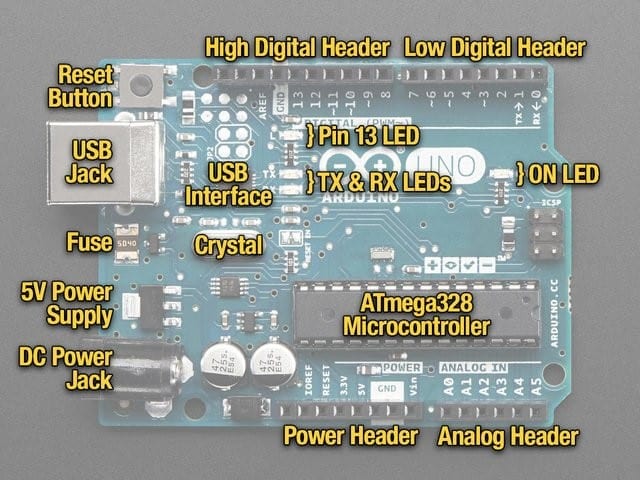
What's on an Arduino Board?
Looking at an Arduino board, you'll find:
- Microcontroller chip (ATmega328P) — the brain of the board
- Digital I/O pins — for connecting sensors, LEDs, and modules
- Analog input pins — for reading analog signals
- USB port — for power and code upload
- Power pins — 3.3V, 5V, GND
- Reset button — restarts the program
- Built-in LED — pin 13, great for testing
Sensors, Shields & Everything in Between
Arduino was built to work with virtually all electronic sensors and modules. It can measure temperature, light intensity, humidity, barometric pressure, distance, and much more. Pair it with actuators to convert electrical energy into movement, light, or heat.
Breakout Boards vs. Shields
| Type | What It Does | How It Connects |
|---|---|---|
| Breakout Board | Makes a single component easier to use | Wires to Arduino pins |
| Shield | Adds complex hardware via simple interface | Stacks directly on top of Arduino |
Getting Started with Arduino
Ready to start? Here's a simple roadmap for beginners:
- Get an Arduino board — browse our Arduino & IoT collection
- Install Arduino IDE — free download from arduino.cc
- Try your first project — blinking an LED (the "Hello World" of Arduino)
- Explore sensors & modules — temperature, motion, ultrasonic distance
- Use a solderless breadboard — prototype your circuit without soldering
- Use libraries — replace complex code with simple, reusable functions
Frequently Asked Questions
What programming language does Arduino use?
Arduino uses a simplified version of C++, with its own libraries and functions that make it beginner-friendly.
Can Arduino connect to the internet?
Yes. With an Ethernet shield or Wi-Fi module (like ESP8266 or ESP32), Arduino can connect to the internet for IoT projects.
What's the difference between Arduino and Raspberry Pi?
Arduino is a microcontroller best suited for real-time hardware control. Raspberry Pi is a mini computer that runs a full operating system. For most sensor and actuator projects, Arduino is the better choice.
Is Arduino good for beginners?
Absolutely. Arduino was specifically designed to be accessible to beginners, with a large community, thousands of tutorials, and affordable hardware. Start with our Arduino & IoT collection to find the right board for your first project.

