Keszoox
FT232RL USB to TTL Serial Adapter — 5V / 3.3V, UART, Arduino & MCU Programmer
FT232RL USB to TTL Serial Adapter 5V / 3.3V, UART, Arduino & MCU Programmer

Couldn't load pickup availability
FT232RL USB to TTL Serial Adapter — 5V / 3.3V, UART, Arduino & MCU Programmer
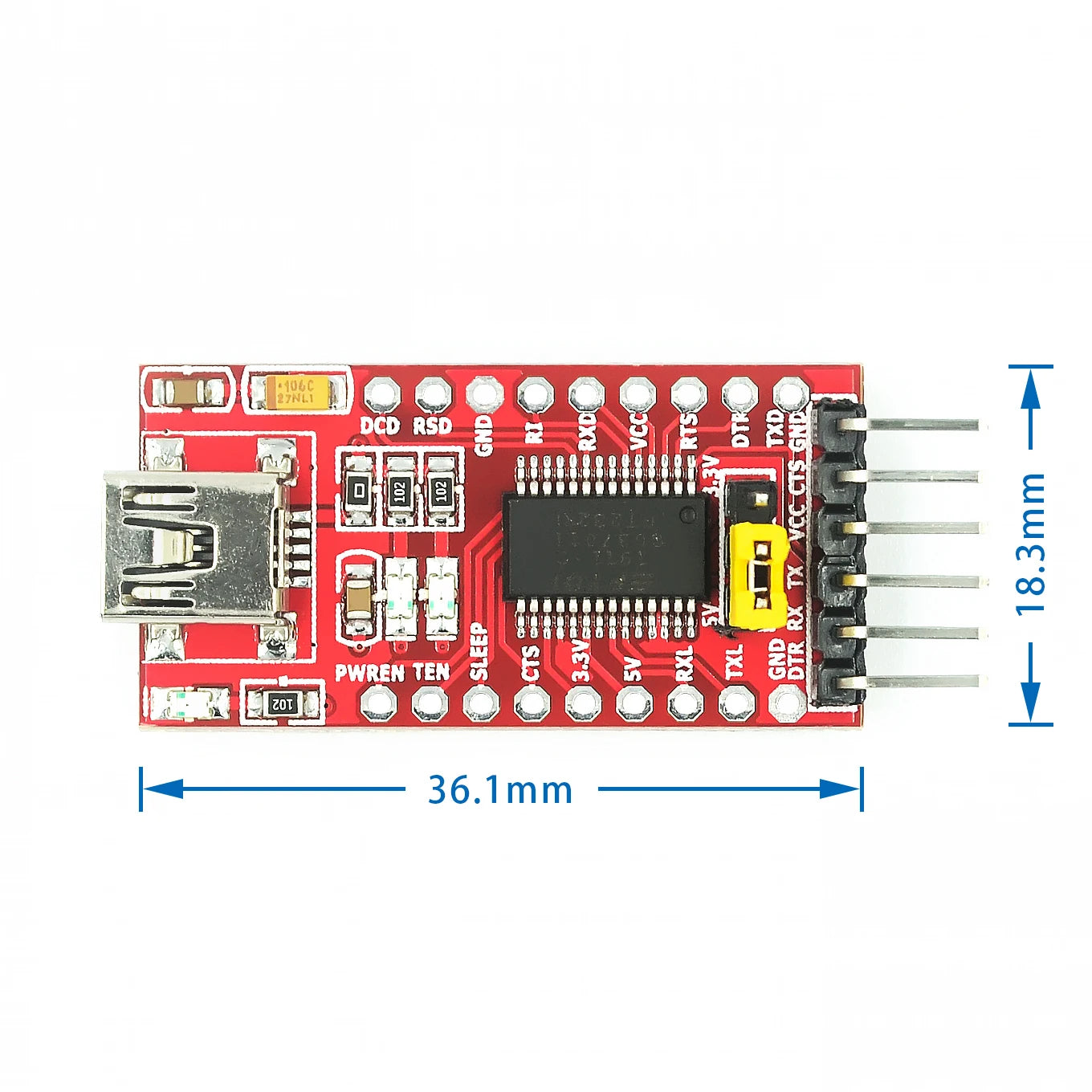
This FT232RL-based USB to TTL serial adapter converts USB to 3.3V or 5V UART (TX/RX) with hardware flow control signals (DTR, RTS, CTS, DSR). The FT232RL from FTDI is the most reliable and widely supported USB-to-UART chip, with native drivers in Windows, macOS, and Linux. It is the standard tool for programming Arduino Pro Mini, flashing ESP8266/ESP32 firmware, and communicating with any MCU UART interface from a PC.
Key Specifications
| Parameter | Value |
|---|---|
| USB Chip | FTDI FT232RL |
| USB Interface | USB 2.0 Full Speed (Mini USB or Micro USB) |
| Logic Voltage | 3.3V or 5V (selectable via jumper) |
| UART Signals | TX, RX, DTR, RTS, CTS, DSR, GND, VCC |
| Max Baud Rate | 3Mbps |
| Output Current (VCC) | 50mA (3.3V) / 500mA (5V from USB) |
| OS Support | Windows, macOS, Linux (native or VCP driver) |
| Operating Temperature | -40°C to +85°C |
FT232RL vs CH340G vs CP2102 — USB-UART Chip Comparison
| Feature | FT232RL (FTDI) | CH340G (WCH) | CP2102 (Silicon Labs) |
|---|---|---|---|
| Driver stability | Excellent (FTDI VCP) | Good (WCH driver) | Excellent (Silicon Labs) |
| macOS native | Yes (10.9+) | Requires driver | Yes (10.15+) |
| Linux native | Yes (ftdi_sio) | Yes (ch341) | Yes (cp210x) |
| Max baud rate | 3Mbps | 2Mbps | 1Mbps |
| Hardware flow control | Full (DTR/RTS/CTS/DSR) | Partial | Full |
| Best for | Professional use, macOS, high baud rate | Cost-sensitive, Windows | macOS, stable driver |
Why Choose FT232RL?
- FTDI native drivers — most stable and widely supported USB-UART chip across all operating systems
- 3.3V / 5V selectable — single adapter works with both 5V Arduino and 3.3V ESP8266/ESP32/STM32
- DTR pin for auto-reset — DTR signal triggers Arduino Pro Mini auto-reset for one-click upload
- 3Mbps max baud rate — highest baud rate among common USB-UART chips for fast firmware flashing
- Full flow control — DTR/RTS/CTS/DSR for applications requiring hardware handshaking
Compatible With
- Arduino Pro Mini (5V/3.3V): Connect TX→RX, RX→TX, DTR→DTR, GND→GND, VCC→5V or 3.3V. Auto-reset via DTR
- ESP8266 (ESP-12E/F): 3.3V mode, TX→RX, RX→TX, DTR→GPIO0 (flash mode), RTS→RST (reset)
- ESP32: 3.3V mode, TX→RX0, RX→TX0, DTR→GPIO0, RTS→EN
- STM32 UART boot: 3.3V mode, TX→PA10 (USART1_RX), RX→PA9 (USART1_TX)
- Any MCU UART: Serial terminal communication at 3.3V or 5V
Frequently Asked Questions
Q: How do I program Arduino Pro Mini with FT232RL?
A: Set jumper to 5V (for 5V Pro Mini) or 3.3V (for 3.3V Pro Mini). Connect: FT232 TX → Pro Mini RX, FT232 RX → Pro Mini TX, FT232 DTR → Pro Mini DTR (or RST via 100nF capacitor), GND → GND, VCC → VCC. In Arduino IDE, select “Arduino Pro or Pro Mini” and the correct processor/speed. Click Upload — DTR auto-resets the Pro Mini into bootloader mode.
Q: Why does my FT232RL show as “FTDI” but not as a COM port?
A: Install the FTDI VCP (Virtual COM Port) driver from ftdichip.com. On Windows, the device may appear as “USB Serial Converter” in Device Manager — right-click and update driver to install VCP driver. On macOS 10.9+, the VCP driver is built-in. On Linux, the ftdi_sio kernel module loads automatically.
Q: How do I flash ESP8266 firmware with FT232RL?
A: Set jumper to 3.3V. Connect TX→ESP8266 RX, RX→ESP8266 TX, GND→GND, 3.3V→VCC. Pull GPIO0 to GND and RST to GND briefly to enter flash mode. Use esptool.py: esptool.py --port COM3 --baud 115200 write_flash 0x0 firmware.bin. Release GPIO0 after flashing and reset to boot normally.
Package Contents
- 1× FT232RL USB to TTL Serial Adapter Module (5V/3.3V selectable)