Keszoox
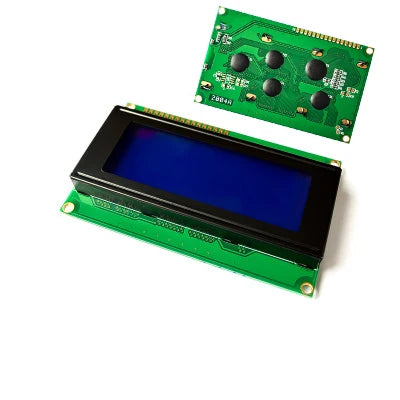
2004 LCD I²C Display Module — 20×4 Characters, Blue Backlight, HD44780, Arduino
2004 LCD I²C Display Module 20×4 Characters, Blue Backlight, HD44780, Arduino

Couldn't load pickup availability
2004 LCD I²C Display Module — 20×4 Characters, Blue Backlight, HD44780, Arduino
This 2004 LCD module combines a 20-column × 4-row HD44780-compatible character LCD with a PCF8574-based I²C backpack adapter, reducing the connection from 16 pins to just 4 wires (VCC, GND, SDA, SCL). The blue backlight with white characters provides excellent readability. With I²C address 0x27 (or 0x3F depending on variant), it is directly supported by the LiquidCrystal_I2C Arduino library and is the standard multi-line text display for Arduino data loggers, sensor readouts, menu systems, and industrial HMI panels.
Key Specifications
| Parameter | Value |
|---|---|
| Display Size | 20 columns × 4 rows (2004) |
| Controller IC | HD44780 (or compatible) |
| Interface | I²C (via PCF8574 I/O expander) |
| I²C Address | 0x27 (default) or 0x3F (variant) |
| Supply Voltage | 5V DC |
| Backlight Color | Blue (with white characters) |
| Character Size | 5×8 dot matrix per character |
| Operating Temperature | -20°C to +70°C |
2004 LCD vs 1602 LCD
| Feature | 2004 LCD (20×4) | 1602 LCD (16×2) |
|---|---|---|
| Characters | 80 (20×4) | 32 (16×2) |
| Rows | 4 | 2 |
| Best for | Multi-line menus, sensor dashboards | Simple 2-line status display |
| Library | LiquidCrystal_I2C (same) | LiquidCrystal_I2C |
Why Choose 2004 LCD I²C?
- 4-wire I²C connection — only VCC, GND, SDA, SCL needed
- 80 characters (20×4) — display 4 lines of sensor data simultaneously
- HD44780 compatible — LiquidCrystal_I2C library, same code as 1602 LCD
- Adjustable contrast — onboard trimmer potentiometer
- Backlight control — on/off via I²C for power saving
Compatible With
- Arduino UNO/Nano: SDA=A4, SCL=A5, 5V, GND
- Arduino Mega: SDA=20, SCL=21
- ESP32: SDA=GPIO21, SCL=GPIO22 (add 4.7kΩ pull-ups to 3.3V)
- ESP8266: SDA=GPIO4 (D2), SCL=GPIO5 (D1)
Frequently Asked Questions
Q: How do I use 2004 LCD I²C with Arduino?
A: Install LiquidCrystal I2C library. Connect SDA to A4, SCL to A5, VCC to 5V, GND to GND. Code: LiquidCrystal_I2C lcd(0x27, 20, 4); lcd.init(); lcd.backlight(); lcd.print("Hello!");
Q: My LCD shows blocks or nothing — how do I fix it?
A: (1) Adjust contrast trimmer on I²C backpack. (2) Verify I²C address with I2C scanner sketch (0x27 or 0x3F). (3) Check SDA/SCL wiring. (4) Add 4.7kΩ pull-ups if using 3.3V MCU.
Q: Can I use 2004 LCD with ESP32 at 3.3V?
A: Connect VCC to 5V, GND to GND, SDA/SCL to ESP32 GPIO21/GPIO22. Add 4.7kΩ pull-ups from SDA/SCL to 3.3V for ESP32 compatibility.
Package Contents
- 1× 2004 LCD I²C Display Module (20×4, blue backlight, PCF8574 I²C backpack)