Keszoox
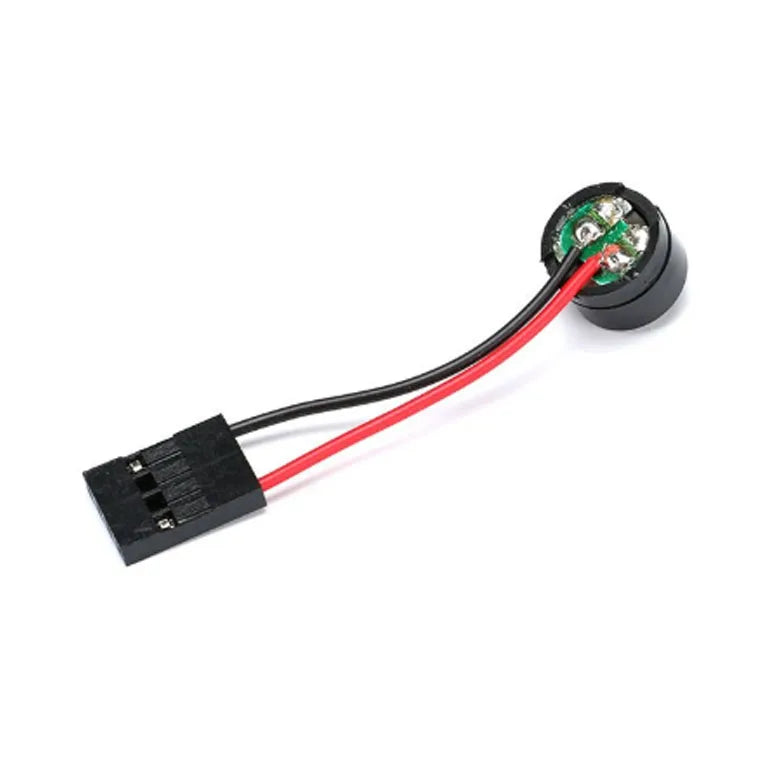
PC Motherboard Internal Speaker Buzzer — POST Beep Code, 4-Pin Header (2-Pack)
PC Motherboard Internal Speaker Buzzer POST Beep Code, 4-Pin Header (2-Pack)

Couldn't load pickup availability
PC Motherboard Internal Speaker Buzzer — POST Beep Code, 4-Pin Header (2-Pack)
This PC case internal speaker connects to the motherboard’s 4-pin SPKR header to produce POST (Power-On Self-Test) beep codes during system startup. When a hardware fault is detected during POST, the BIOS generates a series of beeps through this speaker to indicate the error type (RAM failure, GPU missing, CPU error, etc.). Essential for diagnosing PC build and repair issues without a display, it is a standard component for PC builders, repair technicians, and system integrators.
Key Specifications
| Parameter | Value |
|---|---|
| Connector | 4-pin header (fits standard SPKR motherboard header) |
| Speaker Type | Piezoelectric buzzer |
| Operating Voltage | 5V DC (from motherboard SPKR header) |
| Sound Output | Audible beep tones for POST codes |
| Cable Length | ~15–20cm (varies by variant) |
| Compatibility | ATX, Micro-ATX, Mini-ITX motherboards with SPKR header |
| Quantity | 2 pieces |
Common POST Beep Codes (AMI BIOS)
| Beep Pattern | Meaning |
|---|---|
| 1 short beep | POST successful (normal boot) |
| 2 short beeps | POST error (check display) |
| 1 long + 2 short | Video card / GPU error |
| 1 long + 3 short | Video memory error |
| 3 long beeps | RAM not detected |
| Continuous beeping | RAM or power supply failure |
| No beep | Speaker not connected or PSU failure |
Why Use a PC Internal Speaker?
- POST beep code diagnosis — identify hardware faults without a display (essential for headless server builds)
- No-display troubleshooting — diagnose RAM, GPU, and CPU issues before connecting a monitor
- PC build verification — confirm successful POST with a single beep before installing OS
- Legacy compatibility — many modern motherboards still include SPKR header for this purpose
- 2-pack value — one for current build, one spare for future repairs
Compatible With
- ATX motherboards: Intel and AMD ATX boards with SPKR 4-pin header (standard location near front panel headers)
- Micro-ATX / Mini-ITX: Most mATX and Mini-ITX boards include SPKR header
- BIOS types: AMI BIOS, Award BIOS, Phoenix BIOS, UEFI (with legacy beep code support)
- NOT compatible with: Motherboards without SPKR header (some ultra-compact boards omit it)
Frequently Asked Questions
Q: Where is the SPKR header on my motherboard?
A: The SPKR (speaker) header is typically located near the front panel connector group (F_PANEL) at the bottom-right of the motherboard. It is a 4-pin header labeled “SPKR” or “SPEAKER”. The connector is keyed — align the “+” wire to pin 1 (positive). Refer to your motherboard manual for the exact location and pinout.
Q: My PC has no beep speaker — how do I diagnose POST errors?
A: Without a speaker, POST errors are indicated by LED codes (Q-LED on ASUS, EZ Debug LED on MSI) or a POST code display (2-digit hex display on some boards). Install this speaker to enable beep code diagnosis. If your motherboard has no SPKR header, use a POST card (PCI/PCIe diagnostic card with 2-digit display) for error code readout.
Q: My PC beeps but I don’t know the code — where do I look up beep codes?
A: Beep codes are BIOS-specific. Check your motherboard manual for the BIOS type (AMI, Award, Phoenix) and look up the beep code table. Common resources: AMI BIOS beep codes at ami.com, Award BIOS codes in the motherboard manual. Count the beeps carefully — distinguish between short beeps (0.5s) and long beeps (1s).
Package Contents
- 2× PC Motherboard Internal Speaker Buzzer (4-pin header, with cable)