



Light Block Sensor Module
Light Block Sensor Module
Compatible JST cables for sensors and modules — secure & reliable. Shop now.

Couldn't load pickup availability
Uses Infrared (IR) beam interruption to detect objects that move through the U-shaped detector uprights.
DESCRIPTION
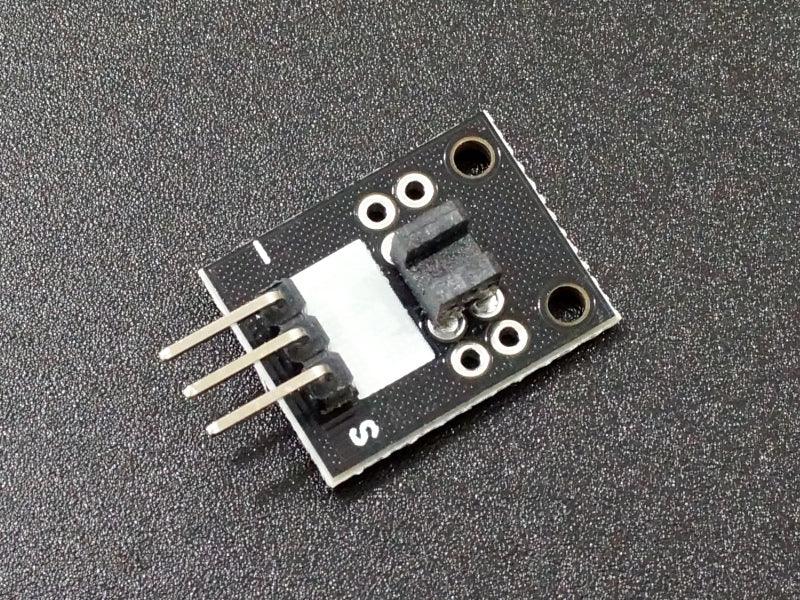
The Light Block Sensor Module uses Infrared (IR) to detect objects that move through the U-shaped detector uprights.
PACKAGE INCLUDES:
- Light Block Sensor Module
KEY FEATURES OF LIGHT BLOCK SENSOR MODULE MODULE:
- IR transmitter / receiver pair
- 3.3V and 5V compatible
The module has an IR transmitter and receiver pair that face each other across a U-shaped housing. An object moving between these uprights breaks the IR beam.
This is a basic module that can be used in applications which use an interruption in a light beam to detect something. One application includes mounting the sensor where a spinning wheel travels through the U-Channel. Cogs or gaps in the edge of the wheel can be detected to calculate RPM, speed or movement. It can also be used to detect if something is open or closed if a a piece of the object moves in and out of the channel when it is opened or closed.\
The output of the module is normally LOW. When an object blocks the light from crossing this housing, the output goes HIGH.
Module Connections
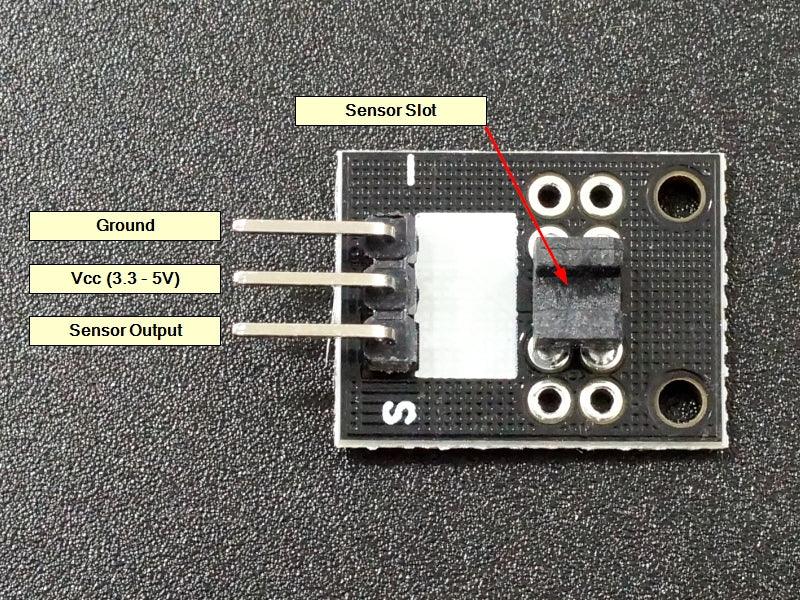
The module has a 3 pin header for making connections.
1 x 3 Header
- ‘-‘ = Ground
- Center pin = 3.3 or 5V to match MCU
- S = Signal output, connects to digital input pin on MCU

OUR EVALUATION RESULTS:
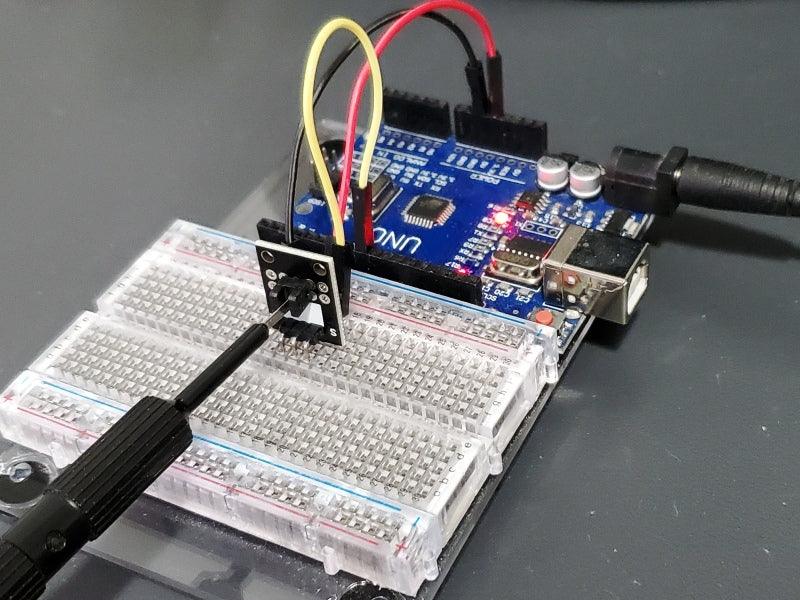
These are easy to use modules. Just hook up power, ground and connect the sensor output pin to a digital input pin on an MCU to monitor it.
If you want a little more capable sensor of this type with larger uprights and a comparator output, check out the Infrared Counting Sensor Module below.
Our example program below monitors the sensor and lights the on-board LED when the sensor is blocked.
We have the sensor pin hooked to pin 8, but can be set to work with any digital input pin.
Light Block Sensor Module Test Program
/*
Light Interrupter Sensor Test

Monitor output from sensor module and light the on-board LED when
an object is blocking the IR beam between the sensor uprights.
*/
int sensorPin = 8;   // Can be any digital input pin
int ledPin = 13;       // Pin that on-board LED is connected to
int sensorVal = 0;  // variable to store the value coming from the sensor
//===============================================================================
//  Initialization
//===============================================================================
void setup() {
  pinMode(ledPin, OUTPUT); // LED pin as output
  pinMode(sensorPin, INPUT); //Sensor pin as input
}
//===============================================================================
//  Main
//===============================================================================
void loop() {
  sensorVal = digitalRead(sensorPin); //read the value of the sensor
  if(sensorVal == HIGH) // turn on LED when sensor is blocked
  {
    digitalWrite(ledPin,HIGH);
  }
  else
  {
    digitalWrite(ledPin,LOW);
  }
}
BEFORE THEY ARE SHIPPED, THESE MODULES ARE:
- Inspected
- Basic operation verified
- Packaged in a resealable ESD bag for protection and easy storage.
Notes:
- This module is similar to or the same as the KY-010.
TECHNICAL SPECIFICATIONS
| Operating Ratings | Vcc Range | 3.3 or 5V |
| Logic high | > 4.8V (when used with 5V) | |
| Logic Low | < 0.2V | |
| Dimensions | L x W (PCB) | 19 x 16mm (0.75 x 0.6″) |
| Country of Origin | China |

Blog posts
View all-

IC Chips & Discrete Components Express Shipping...
Shipping IC chips and discrete electronic components internationally requires more than choosing a carrier. ESD-safe packaging, correct HS codes, accurate customs declarations, and carrier selection for your destination all determine...
IC Chips & Discrete Components Express Shipping...
Shipping IC chips and discrete electronic components internationally requires more than choosing a carrier. ESD-safe packaging, correct HS codes, accurate customs declarations, and carrier selection for your destination all determine...
-

From Prototype to Mass Production — How to Scal...
Scaling from prototype to mass production is the most critical transition in a hardware product's lifecycle. The sourcing strategy that works for 10 prototype boards — cut tape, spot pricing,...
From Prototype to Mass Production — How to Scal...
Scaling from prototype to mass production is the most critical transition in a hardware product's lifecycle. The sourcing strategy that works for 10 prototype boards — cut tape, spot pricing,...
-

ISO 9001 Electronic Component Distributor — Wha...
ISO 9001:2015 certification is the most widely recognized quality management standard in the world — but what does it actually mean when an electronic component distributor claims to be ISO...
ISO 9001 Electronic Component Distributor — Wha...
ISO 9001:2015 certification is the most widely recognized quality management standard in the world — but what does it actually mean when an electronic component distributor claims to be ISO...


