Keszoox
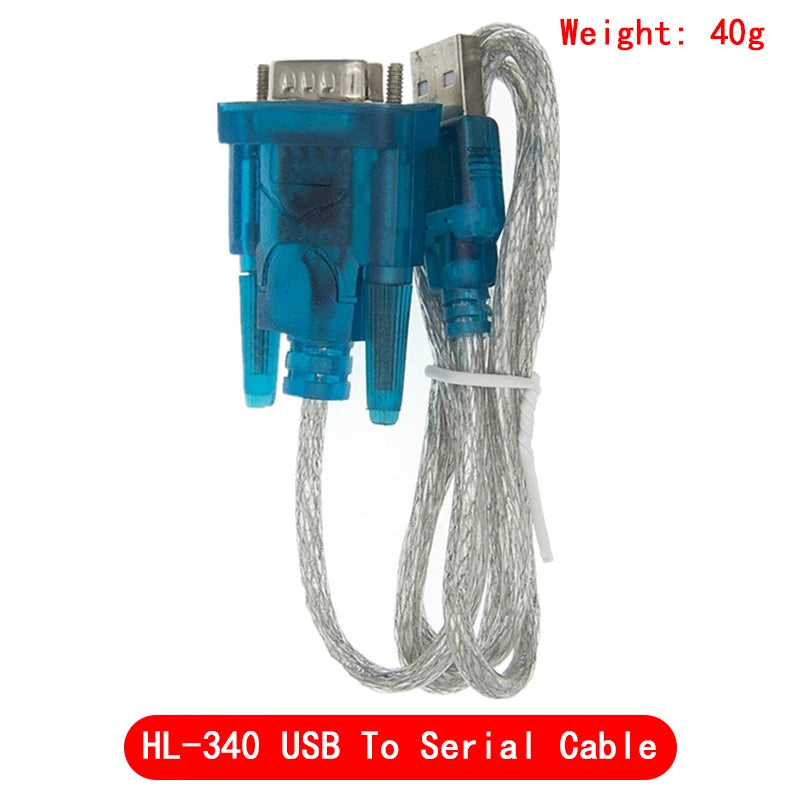
HL-340 USB to RS232 Serial Adapter DB9 Cable | Windows 7/8/10/11 64-bit | CH340 Chip | COM Port Converter
HL-340 USB to RS232 Serial Adapter DB9 Cable | Windows 7/8/10/11 64-bit | CH340 Chip | COM Port Converter

Couldn't load pickup availability
HL-340 USB to RS232 Serial Adapter — DB9 Cable | CH340 Chip | Windows 7/8/10/11 64-bit
Add a hardware RS232 COM port to any modern laptop or desktop that lacks a serial port. The HL-340 USB to RS232 adapter uses the CH340 USB-to-UART bridge chip to create a fully functional RS232 serial port accessible as a standard Windows COM port — compatible with all software that uses the Windows COM port API. The DB9 male connector mates directly with RS232 equipment without adapters. Essential for programming PLCs, configuring industrial equipment, communicating with GPS receivers, updating CNC machine firmware, and interfacing with any legacy RS232 device.
Specifications
| Model | HL-340 |
| USB Chip | CH340 (340 chip variant also available) |
| Interface | USB Type-A (host) to DB9 Male (RS232) |
| Signal Standard | RS232 (±12V signal levels) |
| Baud Rates | 300 bps – 921,600 bps |
| Supply Voltage | 3.3V – 5V (USB powered) |
| OS Support | Windows 7/8/10/11 (32-bit and 64-bit), Linux, macOS |
| Driver | CH340 driver (free download from WCH official website) |
| Connector | DB9 Male (9-pin D-sub) |
| Origin | Mainland China |
RS232 vs. USB — Why RS232 Still Matters
Despite USB replacing RS232 on consumer devices, RS232 remains the dominant serial interface in industrial, scientific, and legacy equipment because:
- Long cable runs — RS232 supports cable lengths up to 15 metres (50 feet) at standard baud rates, far exceeding USB’s 5-metre limit
- Noise immunity — ±12V signal levels provide excellent noise immunity in industrial environments
- Simplicity — RS232 requires no enumeration, no drivers on the device side, and no protocol overhead
- Legacy installed base — millions of PLCs, CNC machines, test instruments, and industrial controllers use RS232 and will continue to do so
DB9 Pin Assignment (RS232)
| Pin | Signal | Direction | Function |
|---|---|---|---|
| 1 | DCD | In | Data Carrier Detect |
| 2 | RXD | In | Receive Data |
| 3 | TXD | Out | Transmit Data |
| 4 | DTR | Out | Data Terminal Ready |
| 5 | GND | — | Signal Ground |
| 6 | DSR | In | Data Set Ready |
| 7 | RTS | Out | Request to Send |
| 8 | CTS | In | Clear to Send |
| 9 | RI | In | Ring Indicator |
Key Features
- ✅ CH340 chip — reliable, widely supported USB-UART bridge with stable Windows 64-bit drivers
- ✅ Windows 7/8/10/11 64-bit support — works with all modern Windows versions including Windows 11
- ✅ DB9 male connector — mates directly with RS232 equipment without gender changers
- ✅ Full RS232 signal support — TXD, RXD, RTS, CTS, DTR, DSR, DCD, RI — all signals available
- ✅ 300–921,600 bps baud range — covers all standard industrial and consumer baud rates
- ✅ USB powered — no external power supply required
- ✅ Linux and macOS compatible — CH340 drivers available for all major operating systems
Common Applications
- PLC programming and configuration (Siemens, Mitsubishi, Omron, Allen-Bradley)
- CNC machine firmware update and configuration
- GPS receiver NMEA data reading
- Industrial instrument configuration (oscilloscopes, power supplies, analysers)
- Modem and router serial console access
- Barcode scanner and POS terminal connection
- Legacy computer and terminal emulation
- Arduino serial monitor via RS232 (with level converter)
Driver Installation (Windows)
- Download the CH340 driver from the WCH official website (wch.cn) or search “CH340 driver download”.
- Run the installer and follow the prompts.
- Plug in the USB adapter — Windows will assign a COM port number (e.g., COM3).
- Verify the COM port in Device Manager under “Ports (COM & LPT)”.
- Configure your serial software (PuTTY, Tera Term, HyperTerminal) with the assigned COM port and correct baud rate.
Frequently Asked Questions
Q: Does this work with Windows 11?
A: Yes. The CH340 driver supports Windows 11 (32-bit and 64-bit). Download the latest driver version from WCH for best compatibility.
Q: Can I use this to program an Arduino?
A: The HL-340 provides an RS232 (DB9) output, not a TTL serial output. Arduino programming requires TTL-level serial (3.3V or 5V). Use a USB-to-TTL adapter (CH340G or CP2102 module) for Arduino programming instead.
Q: What is the maximum cable length I can use with this adapter?
A: RS232 supports cable lengths up to 15 metres (50 feet) at standard baud rates. At lower baud rates (9600 bps), longer cables may work reliably.
Package Contents
- 1× HL-340 USB to RS232 DB9 Serial Adapter Cable (chip variant as selected)