

Keszoox
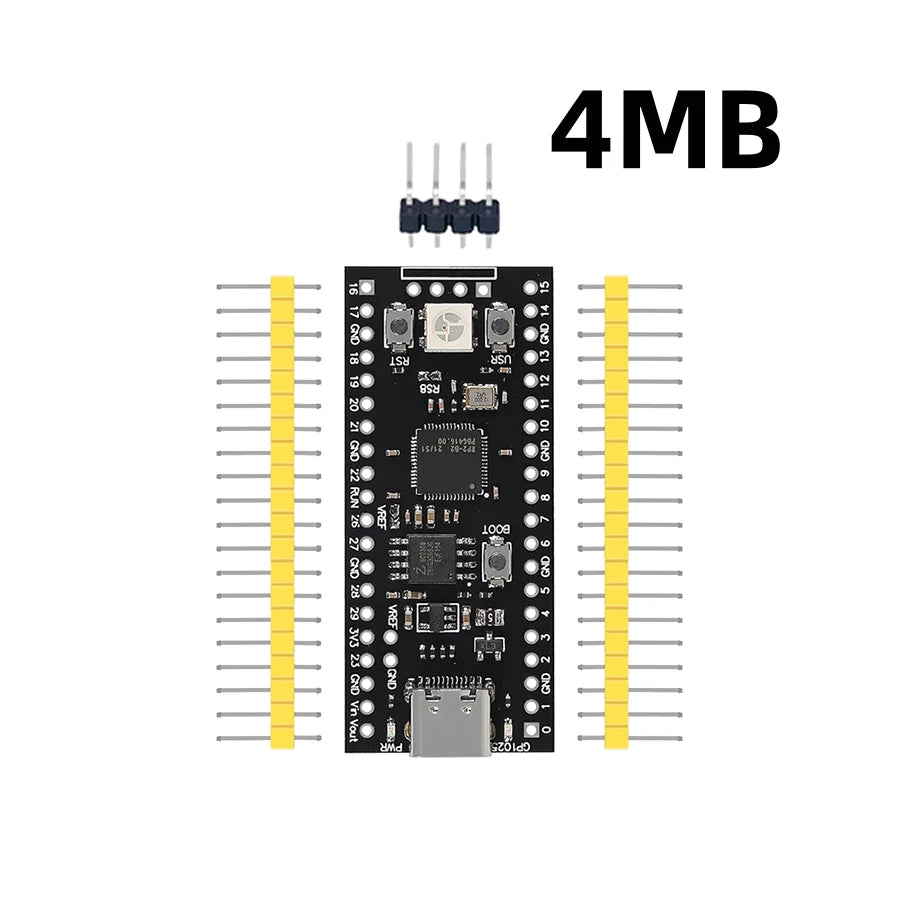
RP2040 Core Board 4MB/16MB Dual-Core Cortex-M0+ USB-C Compatible with Raspberry Pi Pico MicroPython Development
RP2040 Core Board 4MB/16MB Dual-Core Cortex-M0+ USB-C Compatible with Raspberry Pi Pico MicroPython Development

Couldn't load pickup availability
RP2040 Core Board — Dual-Core Cortex-M0+ with USB-C, 4MB/16MB Flash
The RP2040 is Raspberry Pi’s first in-house designed microcontroller, and this compact core board brings its full capability to your projects in a breadboard-friendly form factor. With a dual-core ARM Cortex-M0+ running at up to 133MHz, 264KB of on-chip SRAM, and your choice of 4MB or 16MB QSPI flash, it delivers serious processing power for IoT, robotics, audio processing, and real-time control applications — all at a fraction of the cost of larger SBCs.
The USB-C interface enables drag-and-drop firmware flashing without any programmer — simply hold BOOT, press RST, and the board appears as a USB mass storage device. Drop your UF2 file in, and it’s running. No drivers, no cables, no complexity.
Key Specifications
- CPU: Dual-core ARM Cortex-M0+ @ up to 133MHz
- SRAM: 264KB on-chip (6 independent banks)
- Flash: 4MB or 16MB QSPI (W25Q series)
- USB: USB-C, USB 1.1 device and host support
- GPIO: 26 multi-function pins (Raspberry Pi Pico-compatible pinout)
- ADC: 3 × 12-bit ADC channels (500kSPS)
- PWM: 16 channels (8 slices)
- PIO: 2 × Programmable I/O state machines (8 total) for custom protocols
- Interfaces: 2× SPI, 2× I²C, 2× UART, USB
- DMA: 12-channel DMA controller
- Supply Voltage: 3.3V (USB-C 5V input with onboard regulator)
- Operating Temperature: −40°C to +85°C
- PCB Size: 23 × 53.5mm, breadboard-compatible
- Weight: 8g
Available Variants
- 4MB Black — standard flash, ideal for MicroPython and CircuitPython projects
- 16MB Black — extended flash for larger firmware, data logging, and audio applications
Firmware Flashing (UF2 Drag-and-Drop)
- Connect the board to your computer via USB-C cable
- Hold the BOOT button, then press RST once
- Release BOOT after 1 second — the board appears as a USB drive (
RPI-RP2) - Copy your
.uf2firmware file to the drive - The board automatically restarts and runs your firmware
Supported Development Environments
- MicroPython — official Raspberry Pi port, Thonny IDE, full hardware API
- CircuitPython — Adafruit’s beginner-friendly Python variant with extensive library support
- C/C++ SDK — official Raspberry Pi Pico SDK with CMake build system
- Arduino IDE — via Earle Philhower’s arduino-pico board package
- Rust — rp-hal embedded-hal implementation
- TinyGo — Go language support for RP2040
RP2040 PIO — The Unique Advantage
The RP2040’s Programmable I/O (PIO) subsystem is its standout feature. With 8 independent state machines running custom assembly programs, PIO can implement protocols like WS2812 NeoPixel, DVI/HDMI output, stepper motor control, and custom serial interfaces — all without CPU overhead. This makes the RP2040 uniquely capable for real-time signal generation and capture tasks that would overwhelm other microcontrollers.
Raspberry Pi Pico Compatibility
This board uses the same RP2040 chip and Pico-compatible pinout, meaning all Pico libraries, shields, and accessories work directly. The 16MB variant provides 8× more flash than the standard Pico for applications requiring large datasets, audio samples, or complex firmware.
Typical Applications
- MicroPython and CircuitPython learning and prototyping
- WS2812/NeoPixel LED strip control via PIO
- USB HID devices (keyboard, mouse, MIDI, gamepad)
- Audio synthesis and I2S audio output
- Stepper motor and servo control
- IoT sensor nodes with Wi-Fi (via external ESP-AT module)
- Data logging with SPI flash or SD card
- Real-time signal processing and waveform generation
Package Contents
- 1 × RP2040 Core Board (4MB or 16MB, as selected)