



Tactile Momentary Pushbutton Switch White Cap 12mm — 4-Pin Breadboard (5-Pack)
Tactile Momentary Pushbutton Switch White Cap 12mm 4-Pin Breadboard (5-Pack)
Compatible JST cables for sensors and modules — secure & reliable. Shop now.

Couldn't load pickup availability
Tactile Momentary Pushbutton Switch — White Cap, 12mm, 4-Pin Breadboard (5-Pack)
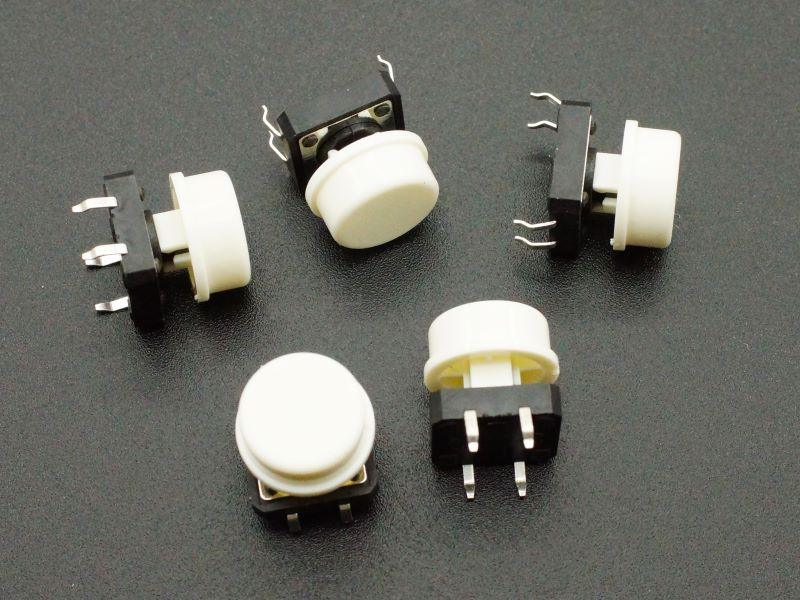
These 12mm tactile momentary pushbutton switches with white snap-on caps are the standard pushbutton for Arduino prototyping and electronics education. The 4-pin through-hole design fits directly into a solderless breadboard on standard 0.1" spacing, the snap-action mechanism provides a satisfying audible click for positive tactile feedback, and the white cap makes the button easy to see and press. Pack of 5 — enough for a full project with spares.
Electrical Specifications
- Contact Style: Normally Open (NO) — momentary closure when pressed
- Terminals: 4-pin (2 pairs of internally connected pins)
- Tested Ratings: Up to 1A @ 32V DC (contact resistance <0.01Ω after testing)
- Action: Snap-action with audible click
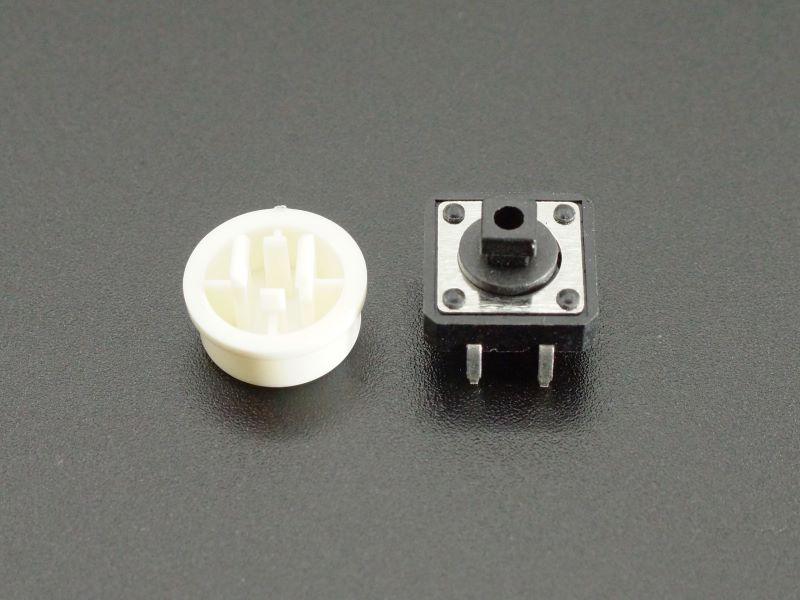
- Cap Color: White (snap-on, replaceable)
- Body Dimensions: 12 × 12 × 7.3mm (without cap)
- Total Height with Cap: 12mm
- Lead Spacing: 5.08mm × 12.7mm (0.2" × 0.5") — breadboard compatible
- Pack Quantity: 5 switches
4-Pin Layout — How It Works
The switch has 4 pins arranged in two pairs. Each pair of pins on the same side of the switch body is internally connected. When the button is pressed, all 4 pins are connected together. For breadboard use, connect one pair to signal/power and the other pair to ground — the switch bridges them when pressed.
- Pins 1 & 2 (one side): internally connected
- Pins 3 & 4 (other side): internally connected
- Press button: all 4 pins connected
Arduino Wiring (Standard)
- One side of switch → Arduino digital input pin (with INPUT_PULLUP enabled)
- Other side of switch → GND
- When pressed: input reads LOW | When released: input reads HIGH
- No external resistor needed when using INPUT_PULLUP
Typical Applications
- Arduino input button: The standard pushbutton for Arduino tutorials and projects
- Reset button: Manual reset for microcontroller circuits
- Menu navigation: OK/Select button for LCD menu systems
- Game controller: Action button for Arduino-based games
- Interrupt trigger: Hardware interrupt source for event-driven programs
Package Contents
- 5 × Tactile momentary pushbutton switch with white 12mm snap-on cap
The classic Arduino pushbutton — snap-action, audible click, breadboard-friendly 4-pin layout, white 12mm cap. Pack of 5 for prototyping and spares.

Blog posts
View all-

IC Chips & Discrete Components Express Shipping...
Shipping IC chips and discrete electronic components internationally requires more than choosing a carrier. ESD-safe packaging, correct HS codes, accurate customs declarations, and carrier selection for your destination all determine...
IC Chips & Discrete Components Express Shipping...
Shipping IC chips and discrete electronic components internationally requires more than choosing a carrier. ESD-safe packaging, correct HS codes, accurate customs declarations, and carrier selection for your destination all determine...
-

From Prototype to Mass Production — How to Scal...
Scaling from prototype to mass production is the most critical transition in a hardware product's lifecycle. The sourcing strategy that works for 10 prototype boards — cut tape, spot pricing,...
From Prototype to Mass Production — How to Scal...
Scaling from prototype to mass production is the most critical transition in a hardware product's lifecycle. The sourcing strategy that works for 10 prototype boards — cut tape, spot pricing,...
-

ISO 9001 Electronic Component Distributor — Wha...
ISO 9001:2015 certification is the most widely recognized quality management standard in the world — but what does it actually mean when an electronic component distributor claims to be ISO...
ISO 9001 Electronic Component Distributor — Wha...
ISO 9001:2015 certification is the most widely recognized quality management standard in the world — but what does it actually mean when an electronic component distributor claims to be ISO...


