



Tactile Pushbutton Switch Module with 10kΩ Pull-Up — KY-004 Arduino Compatible
Tactile Pushbutton Switch Module with 10kΩ Pull-Up KY-004 Arduino Compatible
Compatible JST cables for sensors and modules — secure & reliable. Shop now.

Couldn't load pickup availability
Tactile Pushbutton Switch Module with 10kΩ Pull-Up — KY-004 Arduino Compatible
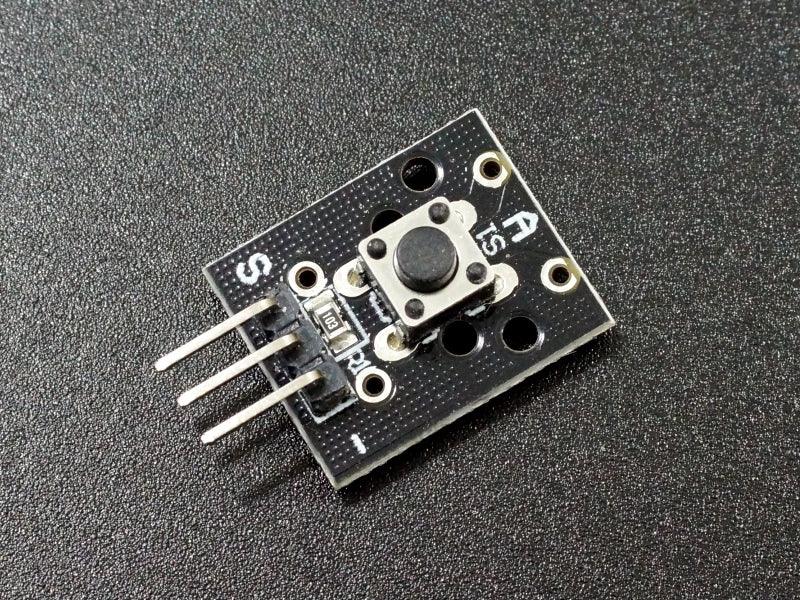
This tactile pushbutton switch module (compatible with KY-004) simplifies button input for Arduino and microcontroller projects by including a built-in 10kΩ pull-up resistor on the PCB. No external resistor or wiring is needed — connect VCC, GND, and the signal pin to your Arduino, and the button is ready to use. The output is active LOW: normally HIGH (pulled to VCC), goes LOW when the button is pressed.
Module Specifications
- Compatible Module: KY-004 (same or similar)
- Operating Voltage: 3.3V – 5V DC
- Output Logic: Active LOW (normally HIGH, LOW when pressed)
- Pull-Up Resistor: Built-in 10kΩ to VCC
- Connector: 3-pin male header (1 × 3, 2.54mm pitch)
- PCB Dimensions: 19 × 16mm
Pin Connections
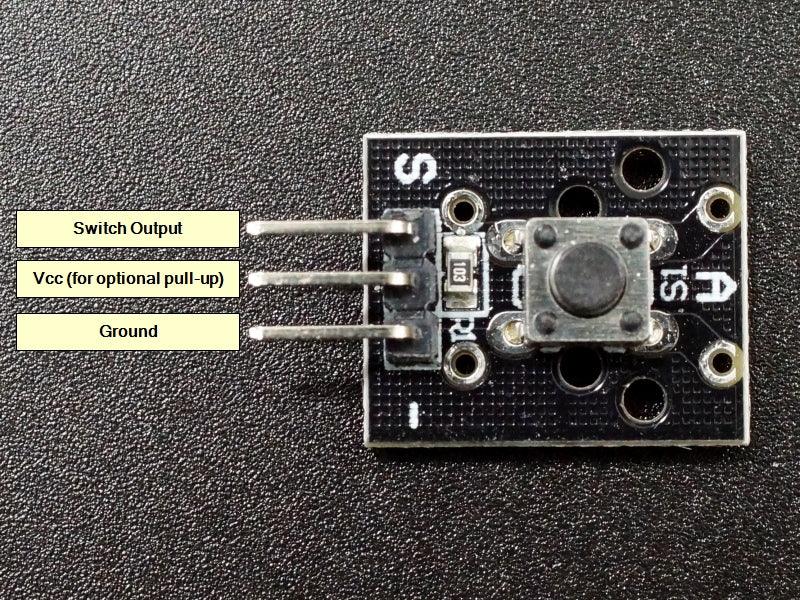
- ‘-’ (Pin 1): GND — connect to Arduino GND
- Center pin (Pin 2): VCC — connect to 3.3V or 5V (or leave unconnected if using MCU internal pull-ups)
- ‘S’ (Pin 3): Signal output — connect to Arduino digital input pin
Arduino Example
// KY-004 Pushbutton Module
const int buttonPin = 2;  // Connect S to D2
void setup() {
  pinMode(buttonPin, INPUT);  // No INPUT_PULLUP needed
  Serial.begin(9600);
}
void loop() {
  if (digitalRead(buttonPin) == LOW) {  // Active LOW
    Serial.println("Button pressed!");
  }
}
Typical Applications
- Arduino button input: Simplest possible button connection — 3 wires, no resistor
- Interrupt trigger: Connect S to an interrupt-capable pin for event-driven response
- Reset / confirm button: User confirmation input for menu systems and state machines
- Sensor kit projects: Standard button module in 37-in-1 and similar Arduino sensor kits
- Beginner projects: Ideal for learning digital input without external component wiring
Package Contents
- 1 × Tactile pushbutton switch module with 10kΩ pull-up (KY-004 compatible)
The simplest Arduino button module — built-in 10kΩ pull-up, active LOW output, 3-pin header. Connect 3 wires and start reading button presses immediately.

Blog posts
View all-

IC Chips & Discrete Components Express Shipping...
Shipping IC chips and discrete electronic components internationally requires more than choosing a carrier. ESD-safe packaging, correct HS codes, accurate customs declarations, and carrier selection for your destination all determine...
IC Chips & Discrete Components Express Shipping...
Shipping IC chips and discrete electronic components internationally requires more than choosing a carrier. ESD-safe packaging, correct HS codes, accurate customs declarations, and carrier selection for your destination all determine...
-

From Prototype to Mass Production — How to Scal...
Scaling from prototype to mass production is the most critical transition in a hardware product's lifecycle. The sourcing strategy that works for 10 prototype boards — cut tape, spot pricing,...
From Prototype to Mass Production — How to Scal...
Scaling from prototype to mass production is the most critical transition in a hardware product's lifecycle. The sourcing strategy that works for 10 prototype boards — cut tape, spot pricing,...
-

ISO 9001 Electronic Component Distributor — Wha...
ISO 9001:2015 certification is the most widely recognized quality management standard in the world — but what does it actually mean when an electronic component distributor claims to be ISO...
ISO 9001 Electronic Component Distributor — Wha...
ISO 9001:2015 certification is the most widely recognized quality management standard in the world — but what does it actually mean when an electronic component distributor claims to be ISO...


