Keszoox
TFT Color LCD Display Module 1.44–2.8" — SPI, ST7735/ILI9341, SD Card, Arduino
TFT Color LCD Display Module 1.44–2.8" SPI, ST7735/ILI9341, SD Card, Arduino

Couldn't load pickup availability
TFT Color LCD Display Module — 1.44–2.8", SPI, ST7735 / ILI9341, SD Card, Arduino
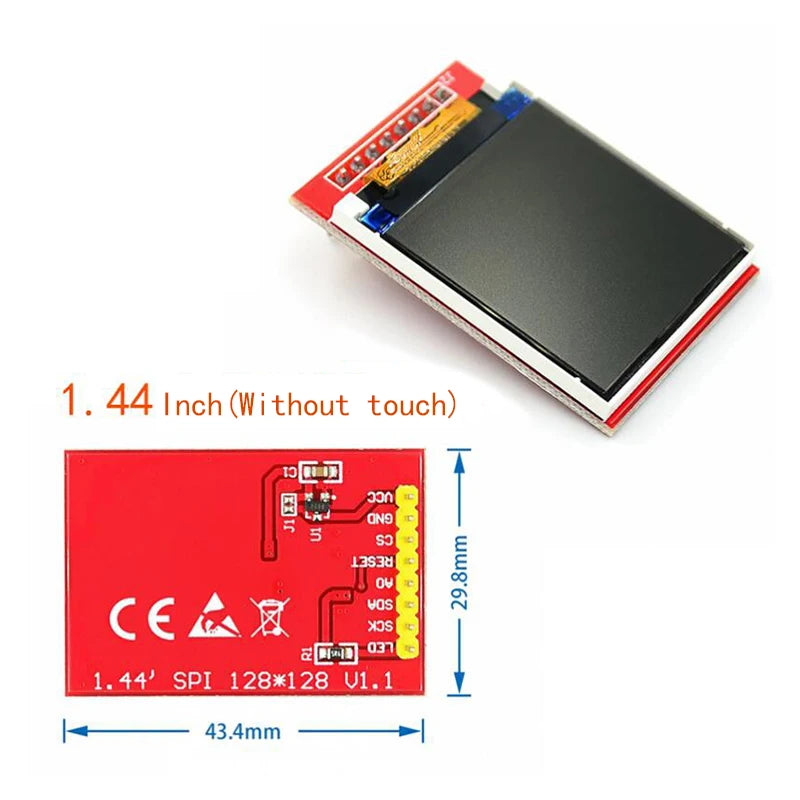
This TFT color LCD display module is available in 1.44", 1.8", 2.0", 2.2", and 2.8" sizes with SPI interface and popular driver ICs (ST7735 for smaller sizes, ILI9225 or ILI9341 for larger sizes). With 128×128 to 320×240 pixel resolution, 65K colors (16-bit RGB565), an onboard SD card slot for image storage, and 3.3V/5V compatibility, it is the standard color graphics display for Arduino weather stations, game consoles, instrument panels, and IoT device HMIs.
Size and Driver Variants
| Size | Resolution | Driver IC | Colors |
|---|---|---|---|
| 1.44" | 128×128 | ST7735 | 65K (16-bit) |
| 1.8" | 160×128 | ST7735 | 65K (16-bit) |
| 2.0" | 176×220 | ILI9225 | 65K (16-bit) |
| 2.2" | 240×320 | ILI9341 | 65K (16-bit) |
| 2.8" | 240×320 | ILI9341 | 65K (16-bit) |
Key Specifications (All Variants)
| Parameter | Value |
|---|---|
| Interface | SPI (4-wire: MOSI, SCK, CS, DC/RS) |
| Supply Voltage | 3.3V – 5V (onboard regulator) |
| Color Depth | 65K colors (16-bit RGB565) |
| SD Card Slot | Yes (SPI, shares bus with display) |
| Backlight | LED backlight (controllable via BL pin) |
| Operating Temperature | -20°C to +70°C |
TFT SPI Display vs I²C OLED vs LCD 1602
| Feature | TFT SPI (this listing) | I²C OLED (0.96") | LCD 1602 I²C |
|---|---|---|---|
| Color | 65K colors | Monochrome | Monochrome |
| Resolution | 128×128 to 320×240 | 128×64 | 16×2 characters |
| Graphics | Full bitmap, images, shapes | Basic graphics | Text only |
| Interface | SPI (4–5 wires) | I²C (2 wires) | I²C (2 wires) |
| Best for | Color UI, images, gauges | Compact status display | Simple text readout |
Why Choose This TFT Display?
- 65K color graphics — display color images, gauges, charts, and custom UI elements
- SD card slot — store and display BMP images from SD card for rich graphical interfaces
- SPI interface — fast data transfer for smooth display updates
- 3.3V/5V compatible — works with Arduino (5V) and ESP32/STM32 (3.3V)
- Multiple sizes — choose the right display size for your enclosure and application
Compatible With
- Arduino UNO/Nano: Adafruit ST7735 library (1.44"/1.8") or Adafruit ILI9341 library (2.2"/2.8")
- ESP32: TFT_eSPI library (fastest, hardware SPI)
- STM32: Arduino STM32 + Adafruit GFX library
- Raspberry Pi: Pillow + ST7735 Python library
Frequently Asked Questions
Q: How do I connect a 1.8" ST7735 TFT to Arduino UNO?
A: Connect: VCC→5V, GND→GND, CS→D10, RESET→D9, DC/RS→D8, MOSI/SDA→D11, SCK→D13, LED/BL→3.3V or D7 (PWM). Install Adafruit ST7735 and Adafruit GFX libraries. Use example: Adafruit_ST7735 tft = Adafruit_ST7735(10, 8, 9); tft.initR(INITR_BLACKTAB); tft.fillScreen(ST77XX_BLACK);
Q: How do I display a BMP image from SD card on TFT?
A: Connect SD card CS to a separate Arduino pin (e.g., D4). Use the Adafruit “spitftbitmap” example sketch. Convert images to 24-bit BMP format (Windows Paint or GIMP), copy to SD card root. The sketch reads BMP files and renders them pixel-by-pixel to the TFT. For faster display, use 16-bit BMP format.
Q: Why is my TFT display showing wrong colors or mirrored image?
A: Wrong colors: check the driver IC variant (ST7735 has multiple initialization types — INITR_BLACKTAB, INITR_REDTAB, INITR_GREENTAB). Try different init types in the library. Mirrored image: use tft.setRotation(0–3) to adjust orientation. Color swap (red/blue swapped): add tft.invertDisplay(true) or swap R and B in the color definition.
Package Contents
- 1× TFT Color LCD Display Module (size and driver as selected)